Installation / System Requirement
If download didn’t start automatically, click the link : Download Vishwakarma Setup directly
Installation on Windows
Double click the downloaded Vishwakarma_UserSetup_win10_win11_x64.exe. No administrator privilege is needed. The setup installs the application to:
C:\Users\<UserID>\AppData\Local\Programs\Mission Vishwakarma\Vishwakarma.exe
A shortcut named Vishwakarma is created on your Desktop and the application launches automatically once installation completes. Running the setup again simply updates the existing installation if it is older.
To install for all users of the machine instead, run the setup from a command prompt with the --allUsers option (installs to C:\Program Files\Mission Vishwakarma\ when permitted, otherwise falls back to the per-user location above).
Once installed, the application keeps itself up to date automatically by downloading the latest signed release in the background and applying it on the next launch.
Windows SmartScreen Notice
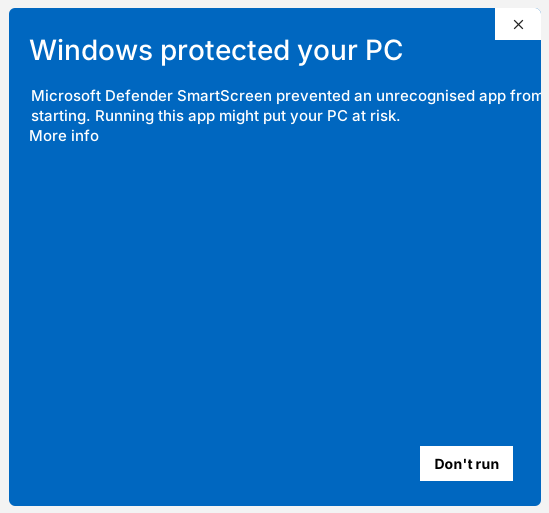
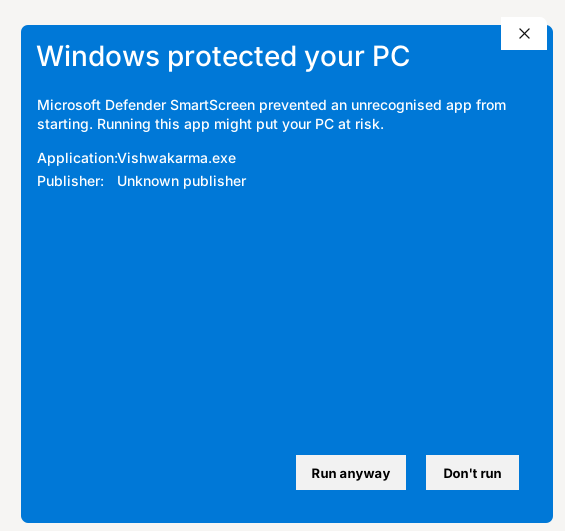
Windows may show this SmartScreen prompt when you run the setup. This happens because Mission Vishwakarma is free and open source software and our executable is not yet signed with a certificate chaining to the Microsoft trust store. Just click “More Info” and “Run Anyway”.
We are waiting for about INR 50k in funding so we can purchase a code signing certificate and remove this annoying warning for users. Until then, please download the setup only from our official release link:
Basics
Just build anything meeting the minimum System Requirement.
Keyboard & Mouse (Left+Middle+Right button) is common to all Desktops (PCs).
Apple Computers with M series processors will also be supported in future. Not supported as of July 2026.
Minimum System Requirement
These requirements are already met be all the Pre-Configured Desktop / Server systems listed further below.
Processors
64 Bit Processor.
Architecture: x64, ARMv8, RISCV(RV23 Profile). Apple hardware not supported as on May 2026.
Minimum System RAM : 4 GB
Maximum System RAM supported: 64 TB
Graphics Card with Either DirectX12 or Vulkan 1.2 or Metal x.y capability.
Monitor
Minimum 720P (1280 x 720 pixel) for Desktop.
1080P ( 1920 x 1080 pixel) is Recommended.
8K ( 7680 x 4320 pixel) maximum.
No Minimum Size for Mobile.
Graphics Card
Integrated Graphics Card on Intel / AMD processors are sufficient.
All Apple Processors have integrated Graphics card only. Apple hardware not supported as on May 2026.
Discrete Graphics Card (From NVIDIA/AMD/Intel) recommended for Desktop.
Must have either DirectX12 or Vulkan 1.2 or Metal Support.
Must support at least Shader Model 6.0. Available on Intel Gen11 onwards (2019+), Nvidia GTX 10xx onwards (2016+), RX 4xx/5xx onwards (2016+) already support this.
Operating System
Windows 10 (On x64) with DirectX12 Capability
Windows 11 (On x64 and ARMv8 both) with DirectX12 Capability
Mac OS (On ARMv8 or newer) with Metal x.y Capability
Android 14 (On ARMv8 or newer) with Vulkan 1.2 Capability
Ubuntu 2024 (On x64 or ARMv8 or RISCV-RV23 Profile) with Vulkan 1.2 Capability
Linux Mint ?
Fedora ?
RHEL ?
Pre-Configured Systems:
Go to a computer shop and ask for any of the following setups.
Low-End Desktop
Processor : Ryzen 5700G or Intel ?
Monitor : 1080p 60 Hz (1 Nos)
Windows 10 or 11
Medium Level Desktop
Processor : Ryzen 9700x
Graphics Card: RTX5060 or RX9060XT
Monitor : 1440p 60 Hz (1 Nos)
Windows 11
Extreme Performance Desktop
Processor : Ryzen 9950x
Graphics Card: RTX5090 or RX9070XT
Monitor : 4K 60 Hz (3 Nos)
Windows 11
Server Systems
Recommended High-End Server
Processor :
Recommended Extreme Server
Processor :